Property files can contain sensitive information. This page explains the practical protections in LetRecord, what you control, and the limits worth knowing before you upload or share.
YOUR RECORDS.UNDER YOUR CONTROL.
WHERE INFORMATION LIVES
Not on the public site.
Account, property and case data are kept in the application's Cloudflare D1 database. Uploaded originals and generated private files are held in Cloudflare R2. The marketing website has no connection to those stores and cannot read your workspace.
LetRecord uses HTTPS for browser connections and keeps account sessions in secure, HttpOnly cookies. Full payment-card numbers are entered on Stripe's hosted checkout, not stored by LetRecord.
01Your deviceEncrypted browser connection
02LetRecord accountAuthenticated workspace and role checks
03Private storageD1 records · R2 files
ORIGINALS / EVIDENCE REGISTER
Keep a trace of each file.
Within the private case workspace, an evidence entry records the original file reference, provenance and fingerprint. The public site does not store or expose your own uploaded evidence.
Click to enlargeEvidence registerActual LetRecord interface. Example names, addresses and records; no customer data.
ACCESS / 01
Only the right workspace.
Users sign in and verify their email. Workspace roles control administrative actions. Active sessions can be reviewed and revoked. A tenant reporting link is limited to submitting a report; it does not open the landlord dashboard.
FILES / 02
Originals stay separate.
Evidence files are stored privately and served through account-checked application routes. SHA-256 fingerprints help compare stored bytes over time, but do not establish that a document was true or complete when created.
SHARING / 03
Make a deliberate choice.
Before producing an Evidence Pack, choose available privacy exclusions and review the finished PDF. A report link can be time-limited and revoked. Anyone holding a valid sharing link may see that selected report until it expires or is revoked.
CONTROL / 04
Keep an exit route.
Export structured workspace records and download original files as needed. Account and workspace deletion controls are available in the application; operational backups and legally required billing or security records may persist for a limited period.
SETTINGS / SYSTEM HEALTH
See the checks. Keep an exit route.
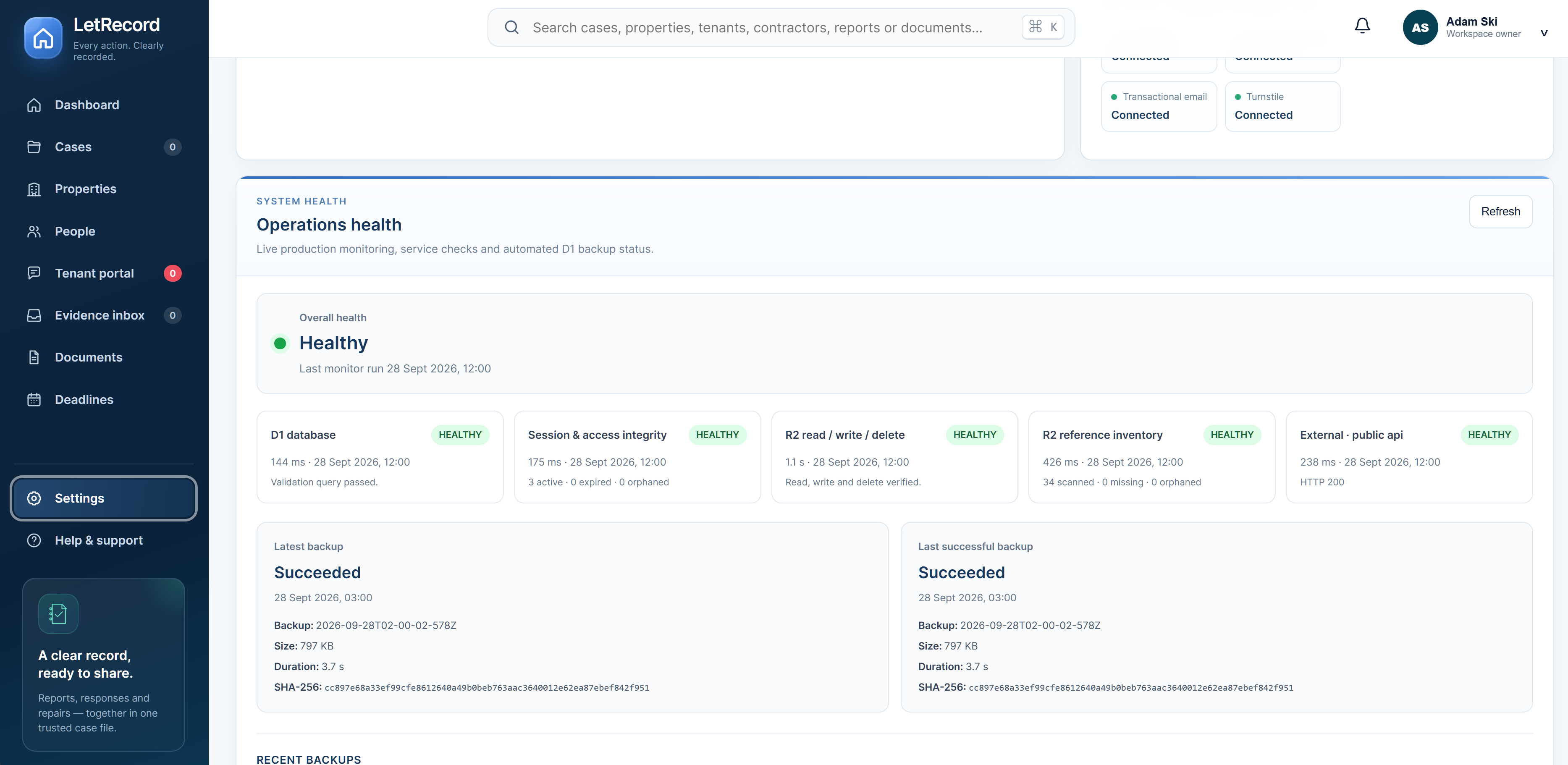
Settings shows the latest monitoring result for the database, account sessions, private file storage and the public API. It also shows the latest reported database backup and the last successful one, so a failed or stale run is visible rather than hidden behind a general “secure” claim.
Database backups cover structured records; do not assume a database backup includes every original uploaded file. Download important originals separately. You can export structured workspace data as JSON, and the account and sharing activity log helps you review significant actions.
01 / MONITORService checksD1 queries, sessions, R2 operations and references, and the public API.02 / BACKUPReported D1 backupsLatest outcome and last success appear in System Health; check their dates.03 / PORTABILITYYour own copiesExport records and download private file originals separately.
Click to enlargeSystem Health in the actual appSnapshot dated 28 September 2026. Check Settings for the current result; this image is not a live status indicator.THE HONEST PART
Security is a practice, not a badge.
We do not claim that an Evidence Pack proves a legal fact or that LetRecord is a compliance certification. Use strong, unique passwords; check who you invite or share links with; avoid uploading unnecessary tenant details; and keep your own copies of important originals. LetRecord is an online service and does not promise offline access.
 LetRecord